I started with a clean install of Rocky Linux, and then I installed the following packages:
sudo dnf install -y net-tools
sudo dnf install -y epel-release
I decided I wanted to create a separate network and have more than one physical connection on different VLANs. Seems like an easy enough task, unless you want to access one VLAN from the other VLAN!
I have two networks in this scenario. My main network is 192.168.1.0/24 and the new network is 10.10.10.0/24. The first address in each network is the gateway. Linux created routes for each interface and assigned automatic metrics to them in sequential order.
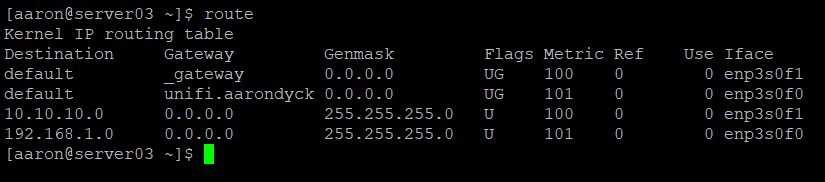

This routing table shows that I have two default routes with different metrics. This won’t do – the lower metric will always be selected, regardless of the originating interface.
It’s worth mentioning that Rocky Linux uses Network Manager, not iproute2, to manage routing tables. You can still view and configure the tables using the ip route command, but this will not survive a reboot. Network Manager overwrites any settings that it does not know about during the startup process. In order to modify anything, it is important to use the correct tool. I used nmcli for the purposes of this post, however it is entirely reasonable to use the other Network Manager tools (nmtui, nm-connection-editor) to make the changes if you are more comfortable with that.
My first interface (enp3s0f0) was assigned a static IP during the server installation process, but the second interface (enp3s0f1) received a DHCP address when it was connected to the VLAN-tagged port for my lab network. I want to have a static IP on this interface, so I will need start with this – I will assign a static IP and remove the DHCP Client. I’m also going to assign this interface to the Firewall zone named work. The interface already has the correct IP address because I have created a static DHCP reservation, but I still want to do things right!
sudo nmcli con mod enp3s0f1 ip4 10.10.10.12/24 gw4 10.10.10.1
sudo nmcli con mod enp3s0f1 ipv4.method manual
sudo nmcli con mod enp3s0f1 connection.zone work
sudo nmcli con down enp3s0f1 && sudo nmcli con up enp3s0f1
Now I have a static IP of 10.10.10.12 and a default gateway assigned to this interface. I can validate this using nmcli
nmcli device show enp3s0f1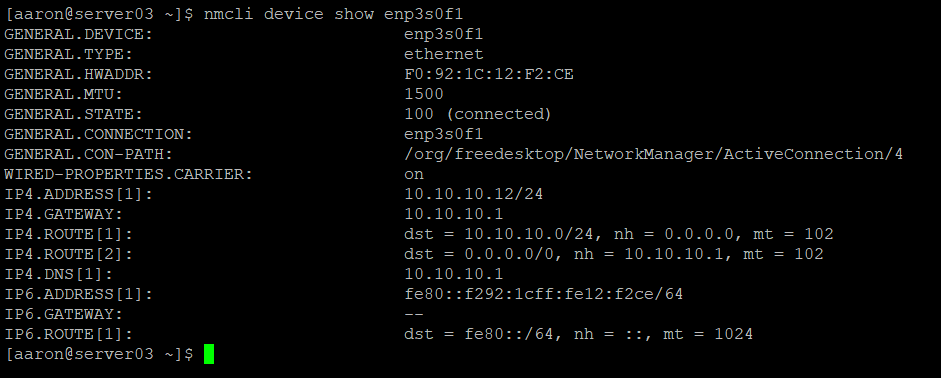
I noticed that IPv6 was enabled. I am not using IPv6 in my environment (yet), so I will disable IPv6 using nmcli. IPv6 is also enabled on enp3s0f0, so I’ll have to fix that as well.
sudo nmcli con mod enp3s0f1 ipv6.method disabled
sudo nmcli con mod enp3s0f0 ipv6.method disabled
sudo nmcli con down enp3s0f1 && sudo nmcli con up enp3s0f1
sudo nmcli con down enp3s0f0 && sudo nmcli con up enp3s0f0
Network Manager uses rules to assign routing tables. There is a default rule list that is built that includes three rules. The rules are evaluated from the lowest number to the highest number. The first rule, Rule 0, will look up rules from the local link table. The remaining two default rules are Rule 32766 which refers to the main table, and Rule 32767 which refers to the default table. Despite the names, the default routes are actually held in the main table. There should be no rules in the default table. You can also see the existing routing table includes a default gateway on each interface and a specific route to each gateway.
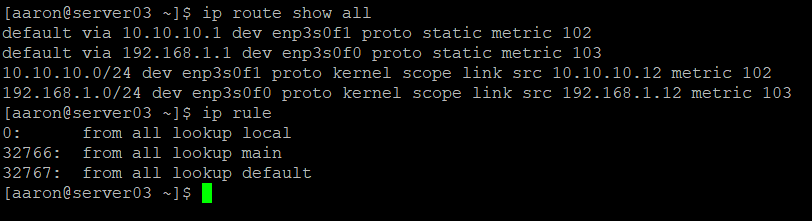
There are additional routing tables that don’t get shown when we show our routes – these can be accessed by referencing specific tables, or even printing all tables.
ip route show table local
ip route show table main
ip route show table all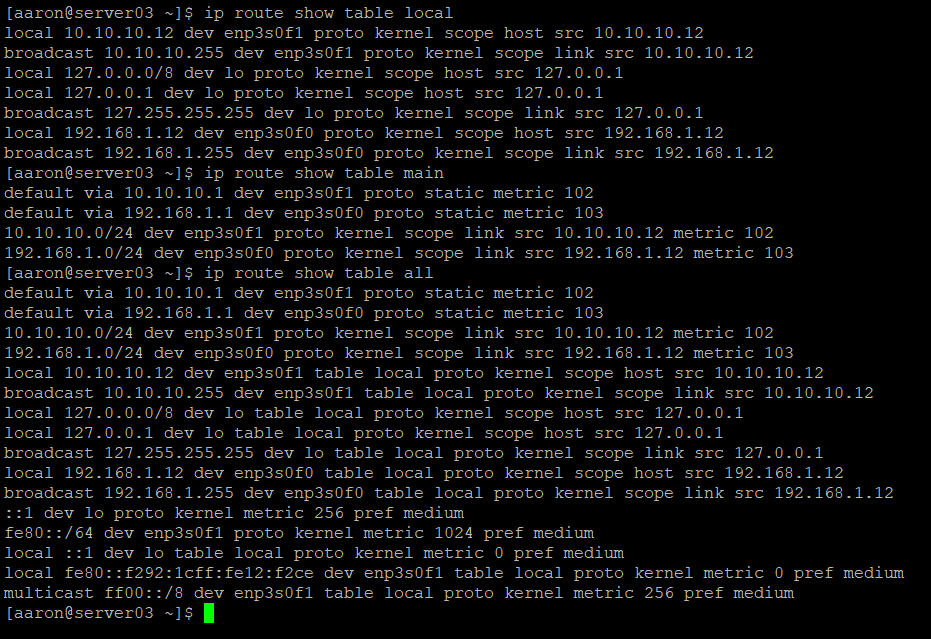
Now that the baseline network configuration has been established, the next step is to look at the routing. With the present configuration, I am unable to reach both interfaces from a device that exists on the same subnet as one of these interfaces.
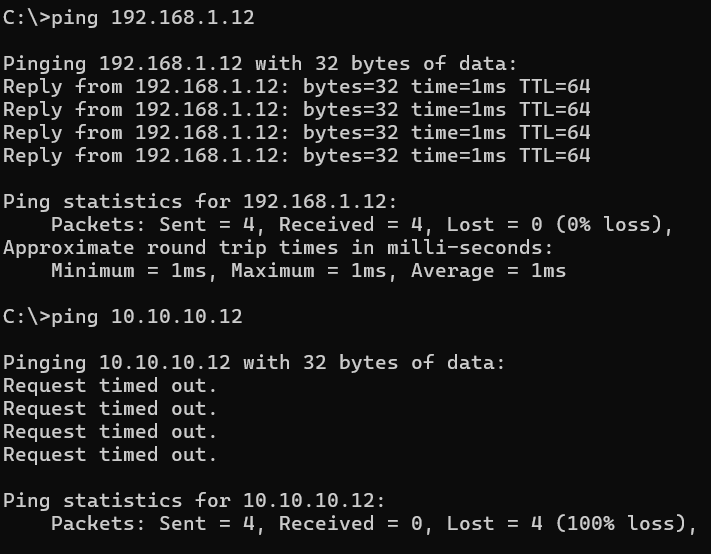
I will define routing tables for each network interface – table 100 on enp3s0f0 and table 200 on enp3s0f1. Once the tables are created, I can populate the tables with rules.
Each table will contain two rules: One rule for the Interface and one rule for the IP.
sudo nmcli con mod enp3s0f0 ipv4.route-table 100
sudo nmcli con mod enp3s0f0 ipv4.routing-rules "priority 100 iif enp3s0f0 table 100"
sudo nmcli con mod enp3s0f0 +ipv4.routing-rules "priority 100 from 192.168.1.12 table 100"
sudo nmcli con mod enp3s0f1 ipv4.route-table 200
sudo nmcli con mod enp3s0f1 ipv4.routing-rules "priority 200 iif enp3s0f1 table 200"
sudo nmcli con mod enp3s0f1 +ipv4.routing-rules "priority 200 from 10.10.10.12 table 200"
Now that I have two new routing tables, but they don’t do much in their current state. I’m going to add a static route to each interface. I’m also going to tell the system that there should be no default routes populated based on the configuration of the interfaces.
sudo nmcli con mod enp3s0f1 ipv4.routes "0.0.0.0/0 10.10.10.1"
sudo nmcli con mod enp3s0f0 ipv4.routes "0.0.0.0/0 192.168.1.1"
sudo nmcli con mod enp3s0f0 ipv4.never-default yes
sudo nmcli con mod enp3s0f1 ipv4.never-default yes
I found it interesting that this actually removed the default gateway I had configured earlier.
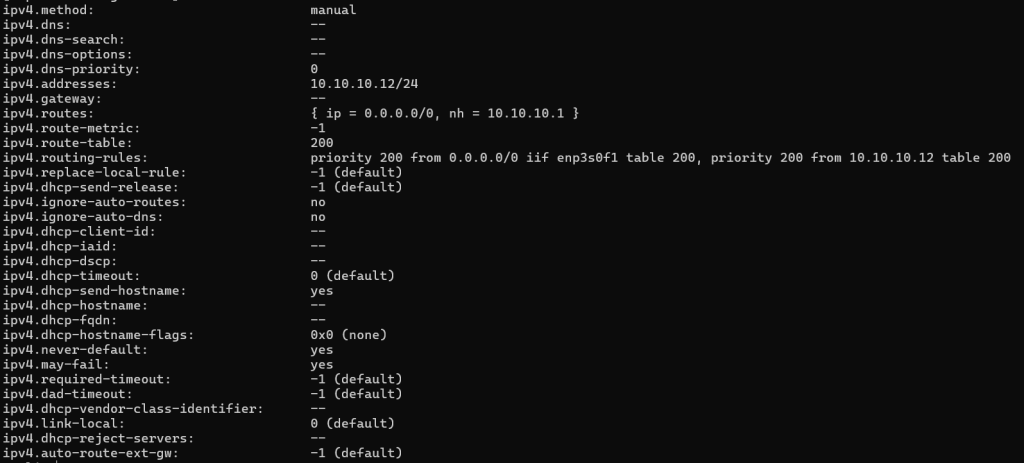
Now I can reach both interfaces! There’s just one problem: I have no route configured on the server that will enable it to create its own outbound connections. When I try to ping anything, even locally-connected network devices, I get a response back that the network is unreachable:
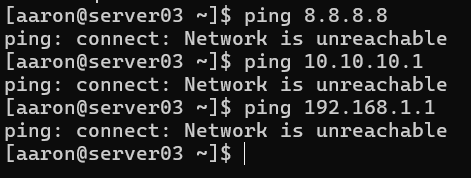
In order to reach other networks, I need a routing rule that will act as a default. I want this rule to be processed after the rules I created earlier, so I will make this rule Priority 1000. I want to use enp3s0f0 as my default interface, so I will have this rule reference Table 100, which is the table I configured for that interface.
sudo nmcli con mod enp3s0f0 +ipv4.routing-rules "priority 1000 from 0.0.0.0 table 100"
sudo nmcli con down enp3s0 && sudo nmcli con up enp3s0
Now I am able to ping out to the Internet – the traffic is leaving from the enp3s0f0 interface.
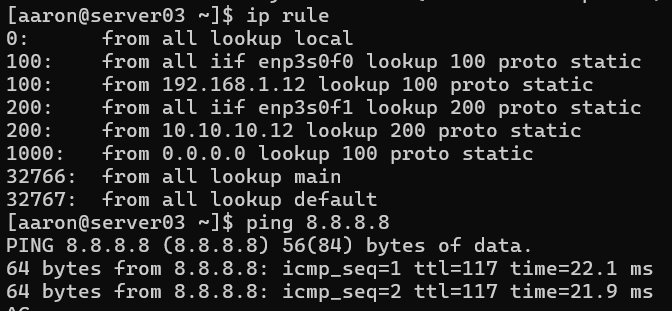
That is Mission Accomplished: I now have the ability to reach either interface from any subnet, including reaching an interface from the subnet that the other interface is attached to. For reference, here are the commands required to set all of this up from a vanilla system:
sudo nmcli con mod enp3s0f0 ip4 192.168.1.12/24
sudo nmcli con mod enp3s0f1 ip4 10.10.10.12/24
sudo nmcli con mod enp3s0f0 ipv4.method manual
sudo nmcli con mod enp3s0f1 ipv4.method manual
sudo nmcli con mod enp3s0f1 connection.zone work
sudo nmcli con mod enp3s0f0 ipv6.method disabled
sudo nmcli con mod enp3s0f1 ipv6.method disabled
sudo nmcli con mod enp3s0f0 ipv4.route-table 100
sudo nmcli con mod enp3s0f0 ipv4.routing-rules "priority 100 iif enp3s0f0 table 100"
sudo nmcli con mod enp3s0f0 +ipv4.routing-rules "priority 100 from 192.168.1.12 table 100"
sudo nmcli con mod enp3s0f1 ipv4.route-table 200
sudo nmcli con mod enp3s0f1 ipv4.routing-rules "priority 200 iif enp3s0f1 table 200"
sudo nmcli con mod enp3s0f1 +ipv4.routing-rules "priority 200 from 10.10.10.12 table 200"
sudo nmcli con mod enp3s0f1 ipv4.routes "0.0.0.0/0 10.10.10.1"
sudo nmcli con mod enp3s0f0 ipv4.routes "0.0.0.0/0 192.168.1.1"
sudo nmcli con mod enp3s0f0 ipv4.never-default yes
sudo nmcli con mod enp3s0f1 ipv4.never-default yes
sudo nmcli con mod enp3s0f0 +ipv4.routing-rules "priority 1000 from 0.0.0.0 table 100"
sudo nmcli con down enp3s0 && sudo nmcli con up enp3s0
sudo nmcli con down enp3s0f1 && sudo nmcli con up enp3s0f1
Views: 39